Cropman.io
Browser-based batch photo editor from 2019: draw one crop and it lands on a whole set of images at once, with every edit applied on the server
Cropman.io was a startup I built in 2019 with classmates from my DAN.IT course, four of us in total. It was an online batch photo editor, served from cropman.io. By then pretty much every site that had anything to do with images already had an editor of its own, and every one of them worked on one photo at a time. Our idea was to take the whole set at once.
The people we built it for were photographers, and really anybody who has to get a pile of photos ready before they go out. Say you've shot one product and there are 40 frames of it. They all need the same crop, a few came off the camera with the wrong rotation, and every one needs a new size and a watermark before publication. That's four jobs you'd do to nearly any photo, and Cropman did them to the whole set in one go. The editing interface ran in the browser, and the pixel work ran on the server.
The team
We started while the course was still running, or just about done, and it was a paid product. I ended up leading the team, which in practice meant the tech lead role, the DevOps side and full stack work on top. I wrote the server almost alone.
Four tools across a set
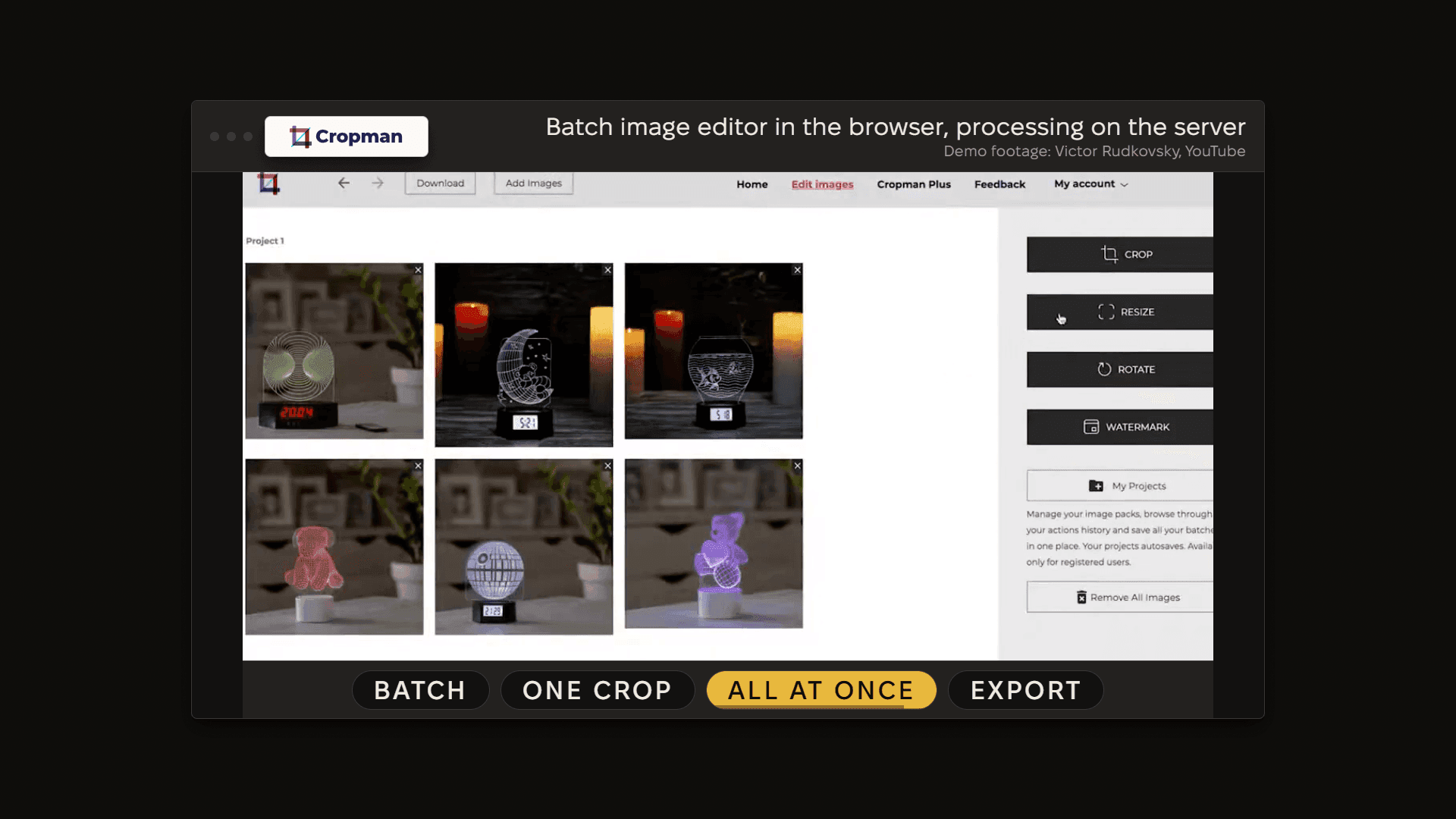
Crop, resize, rotate and watermark. Crop is the interesting one, because cropping a set of different photos in one move is a pretty awkward idea. The thing that's shared across the photos is the crop size. Each photo keeps its own position for the box, since the product sits in the middle of one frame and off to the left in the next. The shared size starts from the smallest crop box, and the smallest photo is the upper limit, so no crop can ever ask for pixels a photo doesn't have. If you'd rather crop each photo on its own, one checkbox turns the shared size off.
A crop area that runs past the edge of a photo is where a lot of editors just throw an error at you. Cropman kept the part of the photo that exists, opened a white canvas at the size you asked for, and put that part on it at the right offset. You got a picture back, with white filling in the missing part.
Resize takes pixels or percent, and "auto" on one side keeps the ratio. Rotation is one call into the image library.
The watermark is a typed text or an uploaded image, with opacity, size, color and position. The size is a percentage of the photo's shorter side, so the same setting carries the same visual weight on a portrait shot and on a landscape one in the same batch. Position is a percentage of each axis for the same reason. A typed watermark gets drawn to SVG with text-to-svg at the size, color and opacity the user picked, and sharp composites it onto the photo. An uploaded image goes a different way: its opacity turns into a tiled alpha mask first, and then it's composited.
The crop box itself is cropperjs, through react-cropper, on a plain canvas, so what the user drags is only a rectangle. The editor state lives in Redux, react-intl carries the four interface languages (English, French, Ukrainian and Russian), and when the set is done it downloads as one ZIP file that jszip builds right in the page.
Undo and projects
A saved project holds the original photos, the current version of each one, the uploaded watermarks, and the ordered list of every operation done to the set. That list is the undo. To step back, the browser sends a shorter list, and the server loads the originals and applies the list again, step by step, each step to the photos it names. An empty list just gives you the originals back. Take a photo out of the project and it's cut out of every step of that history at the same time. Since the list lives on the server, the undo survives a closed browser window, so it's really a universal Ctrl-Z.
flowchart LR
  U[User steps back in the history] --> S[Browser sends the shorter operation list]
  S --> O[Server loads the original photos]
  O --> R[Replay each operation in order]
  R --> W[Edit workers redo the pixel work]
  W --> P[New current version replaces the old file]
  P --> V[Project shows the earlier state]
That costs some machine time on every step back, and in return storage stays simple. On an account, those files sat in Firebase Cloud Storage, one folder per project, split into originals, current versions and watermarks, with every write checked against a checksum.
Each project also got a thumbnail, a small contact sheet the server composed from its photos. Each tile was cut around the busiest part of the photo instead of the center, because the center of a product shot is often just background. A project with one photo fills the whole thumbnail.
Free and paid
Anybody could try it with no account at all. Anonymous work sat in temporary storage and was deleted after 30 minutes. The expiry lived on the database record itself, and the database removed it, so no cleanup job had to go around after it. Anonymous use took up to 5 photos. A free account got 10 photos in a project and 3 projects total, with the saved history on top. The paid plan, "Cropman Plus", went up to 999 photos, which the interface simply called unlimited, and the upgrade panel offered it for about the price of a coffee cup.
The paid side was a monthly subscription through LiqPay, and LiqPay hosted the checkout page, so a card never touched our service. The plan record carried its own expiry, and every successful renewal pushed it forward. If renewals stopped, the plan lapsed about a month later and the account went back to the free limits, with nobody having to run anything.
The backend and the image library
The first generation ran on Google stateless services. After that we moved to one backend: a single Express service on Node.js, with MongoDB behind, holding the users, the plans, the projects and the anonymous sessions.
Our first image library was jimp, and for batch work it was the wrong pick. So we moved the editing into worker threads and switched to sharp, which runs on libvips and just works so much better for image editing, especially when a whole batch has to go through. The pool had four kinds of worker, for upload, edit, preview and download, and each kind had its own queue. Each kind kept at least 1 worker and could grow to 100. Extra workers started up under load and shut down once their queue was empty, so the pool settled back on its own afterwards.
flowchart LR
  B[Browser batch] --> C[One crop for all]
  C --> Q[Job queue by type]
  Q --> D[Download workers]
  D --> E["Edit workers (sharp)"]
  E --> U[Upload workers]
  U --> H[Project history saved]
  H --> Z[ZIP export in browser]
On the client, the interface started on Ant Design and finished on Material UI. The frontend was hosted on Firebase, and Firebase took care of sign-in as well.
Hosting and cost
The backend moved around a fair bit. It started on Heroku, where a free machine falls asleep and the next batch has to wait for it to wake up, then went to Azure Web Apps, and ended up on Google App Engine. The refinement of the backend (the library swap included), happened while that last move was going on.
Google App Engine is where the cost really dropped. The service ran on 1 machine at rest and 2 at full load, with the second one starting when processor use went above 60 percent. When nobody was using it, all we paid for was one small machine, and when we needed to scale, it scaled.
Traction
I once ran 10 workers in parallel myself, and the database didn't feel it at all. Usage peaked at 100 to 200+ edits a day. There were lots of free users and around 100 paying subscribers, and the subscriptions covered what the product cost to run. Bug reports started to come in too, which is a pretty good sign that people are really using the thing.
There's a recorded walkthrough of the product on YouTube by Victor Rudkovsky.
I left Cropman when I took the job at Qberry.
Stack
- React
- Material UI
- Redux
- cropperjs
- react-intl
- jszip
- Node.js
- Express
- MongoDB
- sharp (libvips)
- text-to-svg
- Firebase
- Google App Engine
- LiqPay
Credits
- Victor Rudkovsky
- Recorded product walkthrough